



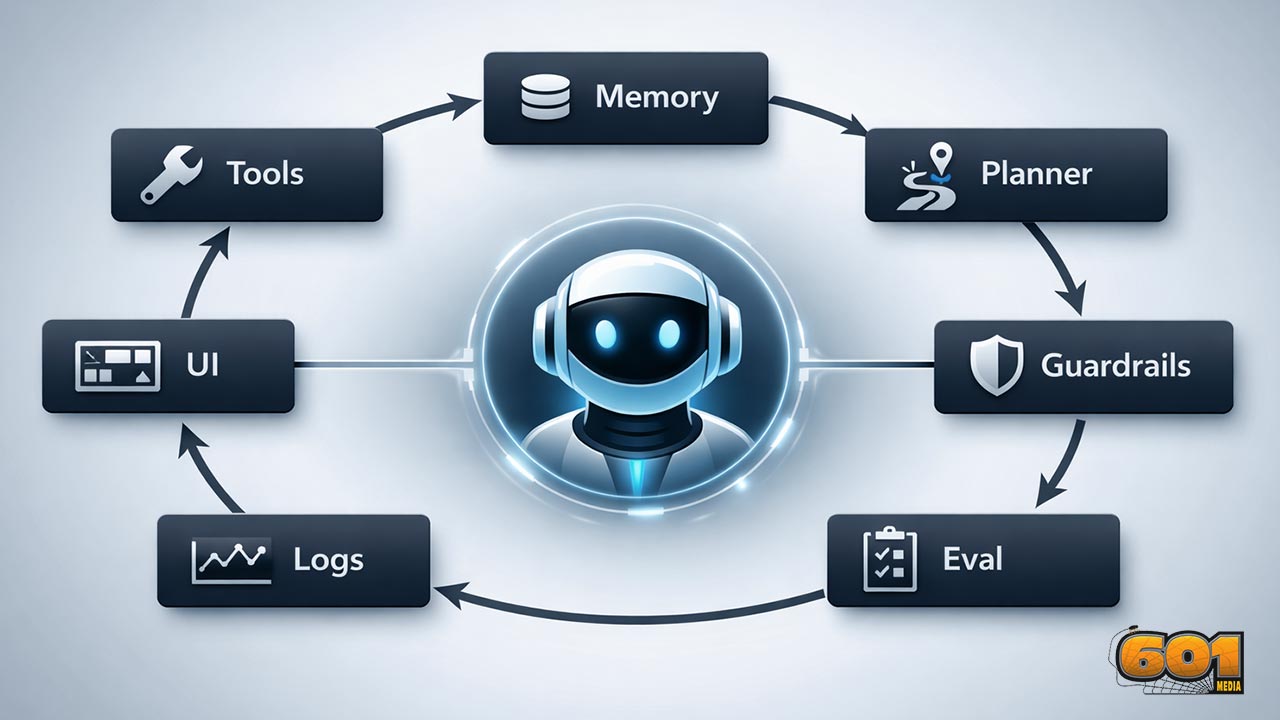
The 7 Core Components of an AI Agent (Tools, Memory, Planner, Guardrails, Eval, Logs, UI)
An AI agent is more than an LLM with a prompt. Reliable agents behave like products: they can take actions safely, remember what matters, plan across steps, prove quality with evals, leave an audit trail through logs and traces, and expose the right controls through a UI. This article breaks down the 7 core components you need to design, ship, and continuously improve agentic systems in the real world.
Table of Contents
- What an AI agent really is (and isn’t)
- Component 1: Tools
- Component 2: Memory
- Component 3: Planner
- Component 4: Guardrails
- Component 5: Eval
- Component 6: Logs
- Component 7: UI
- Putting it all together: a practical blueprint
- Top 5 Frequently Asked Questions
- Final Thoughts
- Resources
What an AI agent really is (and isn’t)
- An “AI agent” is a system that can pursue a goal across multiple steps by deciding what to do next, using external capabilities (tools), and updating its behavior from context (memory) while operating under constraints (guardrails). Some agents are narrow and deterministic; others are flexible and conversational. What makes them agents is not personality. It’s the closed loop: perceive → decide → act → observe results → iterate.
- A helpful way to think about agent design in Innovation and Technology Management terms is that you are engineering a socio-technical workflow. The LLM is a reasoning engine, but the agent is the product: policy, interfaces, process, and measurement wrapped around the model.
- Agents fail in ways that single-shot chatbots do not. They can take the wrong action, take the right action at the wrong time, spend money in loops, leak data through tools, or silently degrade after upstream changes. That is why the “seven components” are not optional extras. They’re the minimum viable architecture for reliability.
Agent architecture at a glance
- Most production agents look like a pipeline with feedback: input → context assembly (memory + policies) → planning → tool execution → response assembly → logging + evaluation hooks. Each component both adds capability and creates new failure modes. A mature architecture treats those failure modes as design inputs.
Why these seven components show up everywhere
- Because they map to the real constraints of deploying AI into business processes: actionability (Tools), continuity (Memory), multi-step control (Planner), safety and compliance (Guardrails), quality assurance (Eval), operability (Logs), and adoption (UI). If one is missing, teams compensate with brittle prompts, manual labor, or risky shortcuts.
Component 1: Tools
- Tools are how agents change the world. Without tools, an agent mostly talks. With tools, it can fetch live data, update systems of record, run calculations, draft documents, open tickets, trigger workflows, and more. This is the “act” in perceive-decide-act.
- Modern agent stacks frequently implement tool calling as structured function calls, where the model chooses a tool and produces machine-readable arguments. This creates a contract between the model and your application layer: the model proposes an action; your runtime executes it and returns results for the model to interpret.
What “tools” mean in agent design
- Tools are capabilities exposed to the agent via a defined interface: inputs, outputs, and constraints. In practice, tools often include: data retrieval, search, database queries, ticketing actions, messaging, code execution, file operations, “computer use” automation, and domain APIs.
- From a management perspective, tools are also governance boundaries. Each tool defines: what the agent is allowed to do, what it is allowed to see, and what must be approved. That makes tool design as much about risk and process as it is about API wiring.
High-leverage tool patterns
- Read tools vs write tools: Separate tools that only read data (low risk) from tools that mutate state (higher risk). This simplifies approvals and reduces blast radius.
- Two-phase commit for sensitive actions: Use a “propose_action” tool that returns a structured plan and a “commit_action” tool that requires explicit confirmation or a policy check. This is a practical guardrail that still preserves agent speed.
- Tool result normalization: Make tool outputs consistent and typed. Agents break when APIs return messy, partial, or ambiguous data. If you normalize results centrally, you reduce prompt complexity and improve reliability.
- Idempotent writes: Make write actions safe to retry. Agents and orchestration layers will occasionally repeat a call after a timeout. Design tools so duplicates don’t cause damage.
- Capability scopes: Expose multiple versions of a tool with different permissions (for example, “create_draft_invoice” vs “send_invoice”). This is a simple way to encode operational policy.
Common tool failure modes and mitigations
- Hallucinated tool calls: The model calls a tool with wrong arguments or uses the wrong tool. Mitigate with strict JSON schema validation, tool argument constraints, and automated tool-evals that score correctness of tool selection and arguments.
- Silent partial failures: APIs sometimes return success codes with incomplete results. Mitigate with tool-side assertions and strong postconditions (“did the ticket actually get created?”).
- Prompt injection via tools: Retrieval or web content can contain adversarial instructions. Mitigate by isolating untrusted content, using content filtering on tool outputs, and applying policy checks before executing write actions.
- Cost blowups: Tools that trigger many downstream calls can amplify spend. Mitigate with budgets, rate limits, and planner constraints (see the Planner section).
Component 2: Memory
- Memory is how an agent maintains continuity: what you prefer, what it already did, what is currently true in a project, and what matters for the next step. Without memory, agents “thrash”—re-asking questions, repeating steps, and producing inconsistent decisions.
- In product terms, memory is a personalization and workflow state layer. It must be useful (improves outcomes), bounded (doesn’t bloat context), and governed (doesn’t create privacy or compliance surprises).
Short-term vs long-term memory
- Short-term (working) memory: The immediate conversational context, recent tool results, and transient scratchpads. The key design problem here is relevance: what belongs in context right now, and what should be summarized or dropped?
- Long-term memory: Durable user preferences, past decisions, artifacts (documents, tickets), and learned facts about a project or domain. Long-term memory typically lives outside the model in databases, vector stores, or knowledge graphs, and is retrieved when needed.
- Procedural memory: Reusable playbooks or “how we do things here.” In organizations, procedural memory is often scattered across runbooks. Agents can benefit from curated playbooks that are versioned and reviewed like code.
Retrieval that actually helps
- Most teams over-index on “more context is better.” In practice, more context often lowers precision and increases latency/cost. High-performing systems treat memory retrieval as an information-retrieval problem with explicit quality criteria.
- Use retrieval with intent: Retrieve because a decision requires it (policy, customer history, system state), not because it might be “nice to have.”
- Chunk and label memory: Store not just raw text, but structured metadata: source, date, owner, sensitivity, and confidence. This improves filtering and reduces misuse.
- Summarize with provenance: Summaries should preserve links back to raw sources. When the agent is challenged, it should be able to show “why” with traceable references.
Privacy and governance considerations
- Memory can become a compliance liability if it stores sensitive data without controls. Treat memory stores like any other system of record: access control, retention rules, and audit logs.
- Use data minimization: store what is necessary to deliver value, avoid collecting sensitive data unless your business case and controls justify it, and give users or admins a way to inspect and delete memory where appropriate.
- From an innovation governance view, memory is also about organizational learning. Teams should version memory schemas, define ownership, and run periodic quality reviews (stale memories cause wrong decisions).
Component 3: Planner
- The planner is the decision-making core that turns goals into steps. Some systems implement planning implicitly through prompting (“think step-by-step”). More robust systems use explicit planning modules: task decomposition, tool selection strategies, and stopping conditions.
- Planning is where you control autonomy. You decide how much freedom the agent has to explore, how it budgets time and money, and when it must ask for approval.
The planner’s job in an agent
- Decompose: Convert a goal into sub-tasks that can be executed with available tools.
- Select: Choose the next best action, including whether to use a tool, ask a clarifying question, or stop.
- Monitor: Detect when the plan is failing (no progress, contradictory evidence, repeated errors).
- Terminate: Stop safely when done, when stuck, or when risk thresholds are hit.
Planning strategies that work in production
- ReAct-style loops with guardrails: Interleave reasoning and actions, but require explicit state updates after each tool call (what changed, what’s next). This makes agent behavior inspectable and easier to evaluate.
- Hierarchical planning: Use a high-level plan (milestones) and a low-level executor (steps). This reduces flailing and makes progress measurable.
- Policy-aware planning: Bake policy constraints into the planner so it never proposes disallowed actions. This is more reliable than “hoping the model remembers the rules.”
- Confidence-triggered clarification: When key variables are unknown (stakeholders, deadlines, permissions), the planner should ask, not guess. This improves precision and reduces costly rework.
Controlling autonomy and cost
- Budgets: Define token/time/tool-call budgets per run. When the budget is hit, the agent must summarize progress and ask for guidance.
- Stop conditions: Enforce hard stops on repeated tool failures, cyclic plans, or unclear objectives.
- Risk tiers: Tie planning freedom to task risk. For low-risk tasks (drafting, summarizing), autonomy can be high. For high-risk tasks (financial actions, customer communications, system changes), autonomy must be bounded by approvals.
Component 4: Guardrails
- Guardrails are the technical and procedural controls that keep an agent safe, compliant, and aligned with organizational intent. Importantly, guardrails are not only about “harmful content.” In enterprises, the bigger risks are often data leakage, unauthorized actions, prompt injection, and policy violations.
- Guardrails exist at multiple layers: before the model (input filtering and policy shaping), around the model (tool permissioning and constrained decoding), and after the model (output checks, human review, and enforcement).
Guardrails beyond “content moderation”
- Action guardrails: What actions are allowed, under what conditions, and with what approvals.
- Data guardrails: What data can be accessed, what can be stored in memory, and what can be shared externally.
- Process guardrails: Required steps, documentation, and audit trails (especially for regulated workflows).
- Business guardrails: Brand voice, pricing rules, legal disclaimers, and customer promise consistency.
Technical guardrail techniques
- Policy + schema constraints: Use structured outputs and schemas so the agent’s decisions are machine-verifiable. For tools, validate arguments; for outputs, constrain formats where needed.
- Classifier gates: Add real-time classifiers to block narrow categories of harmful or disallowed behavior. This can include input and output scanning, as well as tool-result scanning for untrusted instructions.
- Least privilege tool access: The agent should only have the tools it needs for the task and only at the minimum permission level required.
- Human-in-the-loop approvals: For high-impact actions, require explicit sign-off. This is not a failure of automation; it is a mature control that enables safe deployment.
Jailbreak resistance and real trade-offs
- Research on defensive safeguards highlights a key reality: stronger protection can increase refusal rates and add compute overhead, so teams must manage trade-offs rather than chasing a mythical “perfect guardrail.”
- For example, Anthropic’s work on “Constitutional Classifiers” reports robustness against “universal jailbreaks” under extensive red-teaming, while also discussing measurable changes in refusal rates and overhead. The core lesson for product teams is operational: treat guardrails as measurable components with targets, not vague ideals.
- In governance terms, guardrails should be versioned, tested, and monitored. When you change a model, tool set, or prompt, you may change safety behavior. Without regression testing, you will ship risk.
Component 5: Eval
- Evals are how you turn “it seems to work” into “we can trust it.” An agent is a complex system with many moving parts. You need evaluation at multiple levels: tool correctness, step quality, policy compliance, and end-to-end task success.
- In technology management, evals are your quality system. They reduce uncertainty, enable iteration, and provide a defensible basis for go/no-go decisions during rollout.
Why evals are non-negotiable
- Agents change over time: prompts evolve, tools change, policies update, models get swapped, and upstream APIs drift. Evals create a repeatable signal that tells you whether quality improved or degraded.
- Modern evaluation approaches include programmatic eval runs, datasets, and grader-based scoring (including trace grading for agents). This allows teams to measure workflow-level reliability, not just individual responses.
Unit, workflow, and system-level evaluation
- Unit-level evals: Does the agent call the right tool with the right arguments? Does it extract the right fields? This is where tool-evals shine.
- Workflow-level evals: Can the agent complete a multi-step process correctly (for example, “open a support ticket, request missing info, apply policy, propose resolution”)? Workflow evals should verify intermediate states, not just final text.
- System-level evals: Reliability under stress: adversarial prompts, long contexts, partial outages, ambiguous instructions, and policy edge cases.
- Regression suites: A curated set of “things that broke before.” This is one of the highest-ROI practices in agent teams because it prevents repeats.
Metrics that map to business outcomes
- Task success rate: Completion with correct outcomes. Define “correct” operationally (did the system state change appropriately, did the user accept the resolution, did an approval happen?).
- Policy compliance: Rate of disallowed actions avoided, sensitive data withheld, required approvals requested.
- Efficiency: Tool calls per task, time-to-resolution, cost per completion. Planners often trade success for cost; measure both.
- User experience: User satisfaction, rework rate, escalation rate. A technically correct agent that creates friction will not scale.
Component 6: Logs
- Logs are the nervous system of production agents. Without logs and traces, you cannot debug failures, prove compliance, investigate incidents, or run disciplined improvement loops.
- Agent systems are especially log-hungry because failures are rarely single-point bugs. They’re emergent behaviors across the model, tools, memory retrieval, and policies. You need end-to-end visibility.
What to capture (and what not to)
- Capture: tool calls (name, arguments, results), planning decisions (chosen step, alternatives if available), policy checks (pass/fail, reason codes), errors, retries, budgets, latency, cost signals, and user-visible outputs.
- Be careful with: raw user data, secrets, tokens, and highly sensitive context. Log redaction and access controls should be treated as first-class requirements.
- Capture provenance: where retrieved information came from, including timestamps and sources. This prevents “mystery context” and improves trust.
Logs, traces, and metrics for agent observability
- In modern observability, logs are one signal among three: logs, metrics, and traces. Traces connect events across a workflow so you can see an entire agent run as a single story, from user input through tool calls to outputs. This is critical for agents because “why did it do that?” is the most common debugging question.
- OpenTelemetry has become a common standard for capturing and correlating telemetry across distributed systems, including logs, traces, and metrics. For agents, adopting standard telemetry patterns makes it easier to integrate with existing reliability operations and incident workflows.
- Many agent development toolkits now ship with built-in tracing that records LLM generations, tool calls, and guardrail events. This shortens debugging cycles and makes evaluation more grounded because you can grade what happened, not what you hoped happened.
Auditability, incident response, and compliance posture
- For enterprise adoption, logs also serve a governance purpose: proving who did what, when, and why. That matters for regulated workflows, customer trust, and internal risk management.
- Security and compliance frameworks commonly emphasize the need to produce, store, and protect logs of significant events and security-related activity. Even when you are not pursuing a formal certification, the same discipline reduces real-world operational risk.
- In practice, “auditability” for an agent often means: the ability to reconstruct a run, show all tool actions, show approvals, show policy checks, and show what data influenced decisions. If you can’t reconstruct it, you can’t defend it.
Component 7: UI
- UI is not a cosmetic layer. It is the control plane where humans supervise, correct, approve, and learn from agent behavior. If the UI is weak, teams either refuse to adopt the agent or they use it unsafely because the system hides critical context.
- In innovation diffusion terms, UI directly impacts perceived usefulness and perceived risk. A well-designed UI reduces cognitive load and increases trust because users can see what the agent is doing and intervene when needed.
Why UI is a core “agent component”
- Agents operate in workflows. Workflows have stakeholders. Stakeholders need visibility and control. UI is where you make agent behavior legible: intent, plan, tool actions, and confidence.
- UI also sets expectation boundaries. If your UI implies the agent is authoritative, users will over-trust. If it communicates uncertainty and shows sources, users calibrate appropriately.
Control surfaces: approvals, explanations, and overrides
- Approval queues: A place where sensitive actions wait for human confirmation. This should be fast and clear, with policy reasons and diffs (“what will change if approved?”).
- Action previews: Before a write tool runs, show the exact payload: recipients, amounts, records to update, messages to send.
- Run timeline: A trace-like UI for humans: what happened, in what order, and with what evidence.
- Editable drafts: Let users modify outputs before sending. This is essential in customer-facing communication and reduces reputational risk.
- Escalation and handoff: A clear “handoff to human” path when the agent is stuck or risk thresholds trigger.
Designing for trust and adoption
- Show sources and provenance: Especially when the agent references retrieved information or makes policy decisions.
- Expose confidence honestly: Use calibrated signals such as “needs confirmation” rather than fake precision.
- Make failure safe: When the agent can’t proceed, it should stop cleanly, summarize, and ask a human—not guess and act.
- Train the organization: Adoption is not only UX. Teams need operating procedures: when to trust, when to review, how to report issues, and how improvements get shipped.
Putting it all together: a practical blueprint
- Here’s a practical way to combine the seven components into a deployment-ready architecture that supports continuous improvement:
- Runtime loop: The agent receives a goal → planner decomposes → tool calls execute → results are interpreted → memory is updated → guardrails check both actions and outputs → UI displays progress and requests approvals when needed → logs/traces capture everything → eval hooks sample runs for quality scoring.
- Operating loop: Production traces reveal failure patterns → eval datasets are updated → prompts/tools/policies are revised → regressions are tested → changes ship behind a rollout plan → monitoring confirms improvements.
A simple maturity model for teams
- Level 1 (Prototype): Tools + prompts. Little to no memory. Minimal guardrails. Success judged anecdotally.
- Level 2 (Pilot): Basic memory retrieval, simple planning constraints, approvals for write actions, initial eval set, basic logging.
- Level 3 (Production): Strong tool contracts, versioned memory, planner budgets, layered guardrails, automated eval runs, tracing, incident playbooks, and UI control surfaces.
- Level 4 (Optimized): Continuous evaluation from production traces, dynamic policy enforcement, cost and latency optimization, and governance processes that keep behavior stable across change.
Build vs buy decisions
- Build the domain logic: Your unique workflows, policies, and tool integrations are competitive differentiation. Owning these enables strategic agility.
- Buy commodity infrastructure: Observability, tracing dashboards, and evaluation harnesses often benefit from specialized platforms—especially if you need fast iteration and strong operational tooling.
- Hybrid is normal: Many teams buy an observability/eval layer while building core tools, memory governance, and UI tailored to their org.
Deployment checklist
- Tools: Schemas enforced, least privilege, idempotent writes, clear error handling.
- Memory: Retrieval quality measured, retention rules defined, deletion supported, provenance tracked.
- Planner: Budgets and stop conditions set, risk-tier autonomy defined, stuck detection implemented.
- Guardrails: Policy checks at input/action/output, approval workflows for sensitive actions, jailbreak testing included.
- Eval: Baseline datasets, regression suite, workflow-level scoring, release gates tied to metrics.
- Logs: Tracing enabled, redaction in place, run reconstruction possible, alerts on critical failure classes.
- UI: Approval queue, action previews, timeline, editable drafts, escalation path, user feedback capture.
Top 5 Frequently Asked Questions
A chatbot primarily generates responses. An agent can also decide and act across multiple steps using tools, keep or retrieve state via memory, operate under guardrails, and be measured via evals and logs. The distinction is operational: agents can change systems and complete workflows.
Start with Tools and Logs. Tools create real value; logs make behavior debuggable. Then add Guardrails for safe action-taking, followed by Eval to prevent regressions. Memory and Planner mature as workflows become more complex. UI should evolve early if humans must supervise actions.
No. Many high-value agents operate with only short-term working context plus live retrieval from systems of record. Long-term memory is most valuable when preferences, ongoing projects, or repeated workflows benefit from continuity. If you add long-term memory, treat it like a governed datastore.
Combine least-privilege tools, policy checks, and approval workflows. Use a two-phase pattern (propose then commit) for high-impact writes, enforce budgets and stop conditions in the planner, and instrument everything with traceable logs.
Good agent evaluation measures both outcomes and process: task success rate, correctness of tool calls, policy compliance, and efficiency. It is reproducible (datasets + graders), tied to release gates, and constantly refreshed using real production traces and real failures.
Final Thoughts
- The most important takeaway is that agent quality is a systems problem, not a prompt problem. Tools give agents leverage, but memory and planning determine whether they use that leverage wisely. Guardrails keep that leverage safe and compliant. Evals convert learning into repeatable progress. Logs make the whole machine observable, debuggable, and auditable. And UI turns raw autonomy into a human-centered product that stakeholders can trust.
- If you are managing innovation in an organization, the seven components also map neatly to adoption risk. Teams don’t reject agents because the model is “not smart enough.” They reject them because the agent can’t prove what it did, can’t be controlled, or can’t be improved predictably. Designing with these components from day one is how you move from demos to durable capability.
Resources
- OpenAI API Guide: Function calling (tool calling)
- OpenAI API Guide: Agents
- OpenAI Agents SDK Docs: Tools
- OpenAI Agents SDK Docs: Tracing
- OpenAI API Guide: Working with evals (Evals API)
- OpenAI API Guide: Agent evals
- OpenTelemetry: What is OpenTelemetry?
- OpenTelemetry Specification: Logs
- Microsoft Engineering Playbook: Logs vs metrics vs traces
- Anthropic Research: Constitutional Classifiers
- ArXiv (paper PDF): Constitutional Classifiers: Defending Against Universal Jailbreaks
- NIST: AI Risk Management Framework


Leave A Comment