



What Is Markdown and How to Use It (Without Getting Tripped Up)
Markdown is a lightweight writing format that uses plain text symbols to create headings, emphasis, lists, links, tables, and code blocks. You write faster because your hands stay on the keyboard, and you publish cleaner because the structure is predictable. This guide explains what Markdown is, where it shines (and where it doesn’t), and how to use it confidently across WordPress, documentation tools, and modern product teams.
Table of Contents
- What Is Markdown
- Why Teams Use Markdown
- Markdown Basics You Can Use Immediately
- CommonMark vs GitHub Flavored Markdown
- Using Markdown in WordPress
- Common Mistakes and How to Avoid Them
- Advanced Usage for Power Users
- Top 5 Frequently Asked Questions
- Final Thoughts
- Resources
What Is Markdown
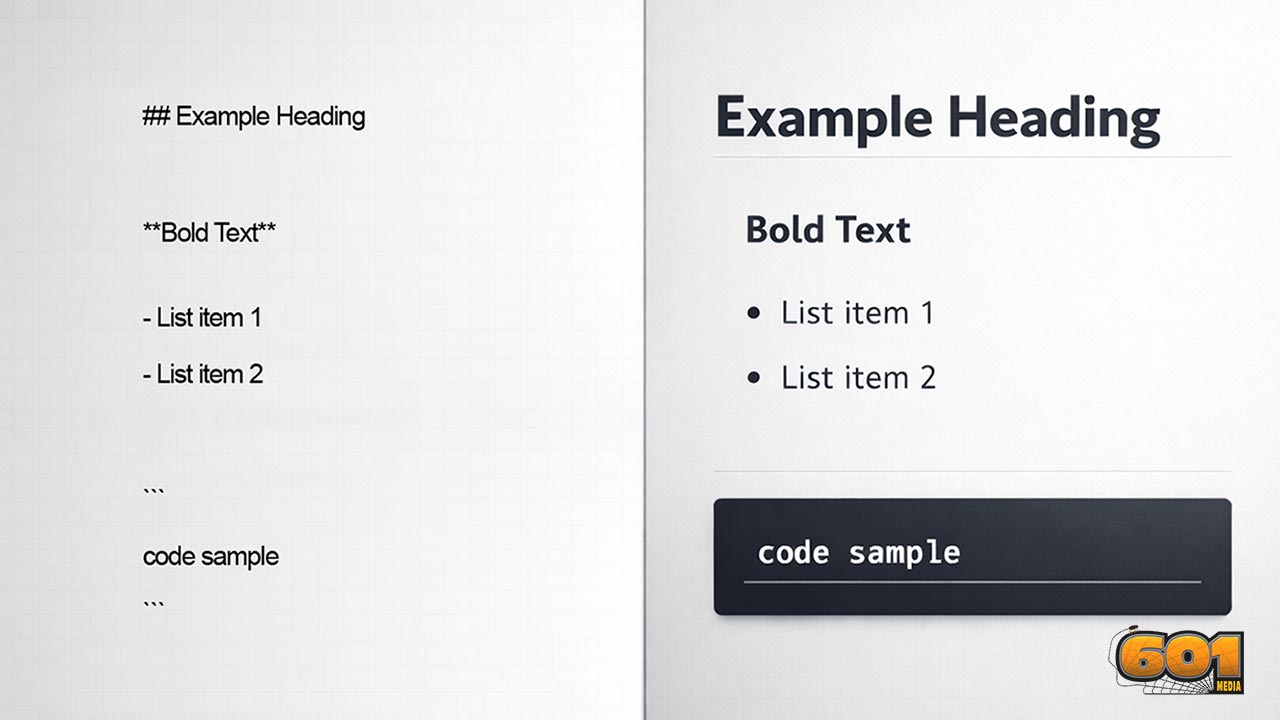
Markdown is a plain-text markup language. In practical terms, it means you can write a document in a simple text editor and still express structure and formatting using a small set of characters such as #, *, -, and backticks. When processed by a Markdown renderer, those symbols become formatted output like headings, bold text, bullet lists, and code blocks.
Markdown’s value is not that it can do everything. Its value is that it does the most common writing tasks well, with minimal friction, and without locking your content into a specific editor. That portability is the hidden superpower: one Markdown file can travel through product documentation, repositories, note systems, static site generators, and publishing platforms.
Markdown was created by John Gruber (with help from Aaron Swartz) and released in 2004.
Why Markdown Exists
Before Markdown became mainstream, writers faced a tradeoff:
- Use a WYSIWYG editor and accept messy, inconsistent formatting under the hood
- Write HTML directly and accept that writing becomes slower and less readable
Markdown was designed to make writing readable in raw text while remaining easy to convert into valid HTML. The original project description frames Markdown as a text-to-HTML conversion tool for web writers that keeps the source easy to read and easy to write.
From an Innovation and Technology Management perspective, this design intent matters. Markdown reduces format friction, the hidden overhead that makes knowledge work less scalable. When formatting becomes a bottleneck, teams either stop documenting or produce documents that are hard to maintain. Markdown makes it easier to keep lightweight documentation alive as products evolve.
Markdown Is a Syntax and a Converter
People often use “Markdown” to mean two related things:
- The writing syntax (the symbols and rules you type)
- The converter or renderer that turns Markdown into HTML (or other formats)
Different renderers can behave differently, which is why you may see Markdown render almost right in one tool and slightly wrong in another. This is exactly the problem CommonMark set out to reduce: CommonMark provides a standard specification and a test suite so implementations behave consistently.
Why Teams Use Markdown
Markdown is not just a writer’s preference. It is an operational choice that influences how knowledge flows through an organization. Teams adopt Markdown because it improves:
- Speed of writing and editing (keyboard-first)
- Consistency of structure (repeatable patterns)
- Portability (content can move between tools)
- Collaboration (diffs and version control work well on text)
- Longevity (plain text is durable)
The strategic angle is simple: in fast-moving product environments, your system of record is distributed. Requirements might live in tickets, architecture decisions in a repo, launch notes in WordPress, and customer docs in a docs site. Markdown acts like a common language between systems.
Markdown for Innovation and Technology Management
Innovation and Technology Management is not only about coming up with new ideas. It is about building repeatable systems that convert ideas into shipped value. Markdown supports that conversion in three high-leverage ways:
- Decision traceability: Architecture Decision Records (ADRs) written in Markdown are easy to store in version control, review, and reference later.
- Knowledge reuse: Templates allow teams to standardize how they write specs, postmortems, experiment reports, and research briefs.
- Cross-functional alignment: When product, engineering, research, and marketing share a common documentation format, you reduce translation overhead.
Markdown is not just formatting. It is collaboration infrastructure.
Governance and Consistency Across Tools
When your org uses multiple tools, governance becomes about guardrails, not control. Markdown helps because:
- It nudges authors into consistent structure (headings, bullets, links)
- It makes review easier (plain-text diffs reveal meaningful changes)
- It supports automation (linters, link checkers, static site builds)
CommonMark provides an unambiguous spec to reduce formatting surprises.
Markdown Basics You Can Use Immediately
If you only learn these basics, you can already write professional docs, README files, and many blog drafts.
Headings
Headings create a document outline, which improves scanning and enables automatic tables of contents in many tools.
- # Heading 1
- ## Heading 2
- ### Heading 3
Best practice for teams:
- Use one top-level title
- Use headings to reflect hierarchy, not visual size
- Keep heading names descriptive and consistent
Bold, Italic, and Strikethrough
Common patterns:
- Bold: **bold**
- Italic: *italic*
- Strikethrough (often GFM): ~~removed~~
Leadership tip: reserve bold for key terms or decisions, not decoration. Excess emphasis reduces signal-to-noise.
Lists and Task Lists
Bulleted lists:
- – Item one
- – Item two
Numbered lists:
- 1. Step one
- 2. Step two
Task lists are a GitHub-flavored extension widely used for coordination.
- – [ ] Not done
- – [x] Done
Links and Autolinks
Basic link syntax:
- [link text](https://example.com)
Use meaningful link text. “Click here” does not scale as a knowledge practice.
Blockquotes
Syntax:
- > This is a quote.
Use blockquotes to separate context from decision to improve clarity and reduce re-litigation.
Code Inline and Code Blocks
Inline code:
- `npm install`
- `README.md`
Code blocks:
- “`
- code here
- “`
Code formatting prevents ambiguity and reduces execution errors in technical documentation.
Tables
Tables are common in GitHub Flavored Markdown and many documentation platforms.
- | Feature | Why it matters |
- | — | — |
- | Headings | Creates structure |
- | Links | Enables navigation |
Tip: tables can be harder to read on mobile. Use short tables or convert to lists for long content.
CommonMark vs GitHub Flavored Markdown
If you have ever asked, “Why doesn’t my Markdown render the same everywhere?” you have already run into Markdown flavors.
Why Flavors Matter
CommonMark exists to reduce ambiguity and make behavior consistent.
GitHub Flavored Markdown (GFM) is a well-known extension used across GitHub.
Inconsistency creates hidden cost:
- Docs break when moved between tools
- Writers waste time fixing formatting instead of improving content
- Templates become unreliable
How to Stay Compatible
If you want Markdown that travels well:
- Write primarily in CommonMark-compatible syntax
- Use GFM-only features when you know the target supports them
- Test rendering in the platform where the content will live
- Document house rules in a short style guide
Using Markdown in WordPress
WordPress can support Markdown in multiple ways depending on your site configuration and whether you use WordPress.com or a self-hosted installation with plugins.
Gutenberg and Markdown
The Block Editor is primarily block-based rather than Markdown-first. If you want a direct Markdown experience, you typically use a Markdown block or plugin.
The Jetpack/WordPress.com Markdown Block
Jetpack documents a dedicated Markdown Block for the WordPress Block Editor.
A Workflow for Writing and Publishing
A reliable workflow:
- Draft in Markdown in a dedicated editor
- Review and iterate
- Convert or paste into WordPress using a Markdown block or conversion tool
- Do final layout checks
- Publish
Common Mistakes and How to Avoid Them
Most Markdown frustration comes from a small set of predictable issues.
Line Breaks and Paragraphs
Markdown treats a blank line as a new paragraph. Many renderers do not treat a single Enter as a visible line break. Write with intentional paragraphs and use lists to structure content.
Indentation and Nesting
Indentation controls nesting and can change how code blocks render. Keep indentation consistent to avoid accidental formatting changes.
Escaping Characters
If you want to show Markdown characters literally, escape them with a backslash:
- \*not italic\*
Advanced Usage for Power Users
Markdown becomes more valuable when it is integrated into your operating model.
Docs-as-Code and Version Control
Many organizations store docs alongside code because Markdown is plain text, easy to diff and merge, and compatible with review workflows.
Templates and Style Guides
High-impact templates include:
- Experiment brief (hypothesis, method, metrics, result, decision)
- PRD-lite (problem, user, constraints, success criteria, risks)
- ADR (context, decision, consequences)
- Postmortem (timeline, contributing factors, corrective actions)
Tooling and Conversion
A strong practice is separating source of truth (Markdown) from render targets (HTML for WordPress, docs site output), so content stays portable.
Top 5 Frequently Asked Questions
Final Thoughts
The most important takeaway is that Markdown is not merely a writing trick. It is a small, scalable standard that improves how knowledge moves through a system. Markdown lowers the cost of maintaining clarity by making structure cheap: headings create shared outlines, lists create shared planning surfaces, links create shared navigation, and code formatting reduces ambiguity.
If you want immediate leverage:
- Adopt a small set of Markdown templates for high-value documents
- Standardize on a baseline (CommonMark) and document allowed extensions
- Connect Markdown writing to your publishing workflow to reduce manual formatting


Leave A Comment