



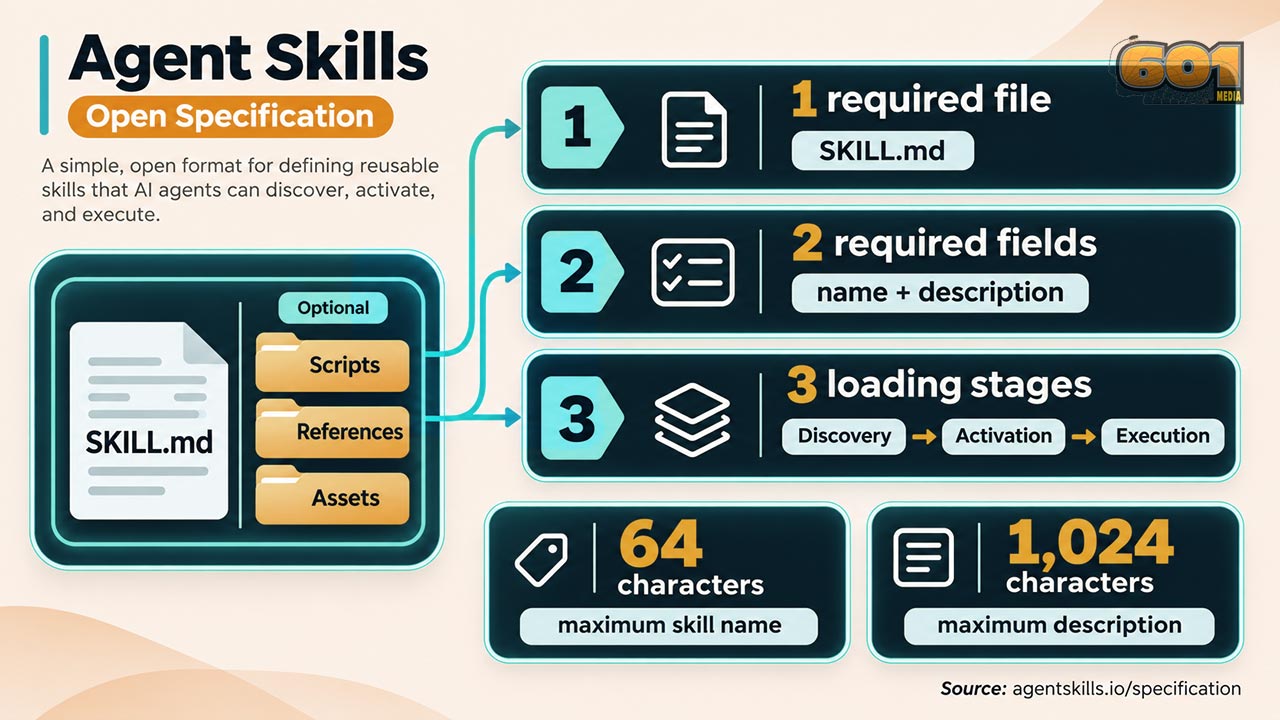
Agent Skills: The Open Standard for Teaching AI Agents How to Work
An AI agent can write code, analyze a document, or prepare an article. Getting it to follow your preferred process every time is harder. Agent Skills offer a practical answer: package the instructions for a particular job in a small folder that a compatible agent can discover and use when the job comes up. Here is how the open format works, what goes inside a skill, and how to create one worth using.
Table of Contents
- What Are Agent Skills?
- Why an Open Standard Matters
- How Agent Skills Work
- What Goes Inside a Skill?
- Build Your First Skill
- Write Instructions That Work
- Skills and Other Ways to Guide an Agent
- Testing, Maintenance, and Security
- Practical Uses for Creators and Developers
- Top 5 Frequently Asked Questions
- Final Thoughts
What Are Agent Skills?
Agent Skills are an open format for giving AI agents specialized instructions and supporting resources. A skill lives in a folder. Its one required file, SKILL.md, contains identifying information and directions for completing a task. The folder may also contain scripts, reference documents, templates, and other assets.
Think of a skill as a reusable work procedure. A video producer might create one that explains how to turn a transcript into a shot list. A developer might create one that describes how to inspect an unfamiliar codebase before changing it. A business owner might create one that outlines the required checks before publishing an article. Each skill gives the agent more context when that particular work begins.
The word “skill” can suggest that installing one changes the AI model itself. It does not. A skill supplies instructions and files to an agent that already has its own model, tools, and operating environment. The agent still needs access to the files and tools required for the job. It also needs to interpret the instructions correctly. A skill can improve consistency, but its presence alone does not guarantee a correct result.
The format is intentionally lightweight. You can start with a single text file, read it in any editor, review its changes in Git, and share it as a folder. That simplicity makes a skill approachable for an individual creator while leaving room for a larger team to add examples, scripts, and documentation as its process matures.
Why an Open Standard Matters
Every creator or organization develops ways of working that are difficult to fit into a single chat prompt. A production company has naming conventions, delivery requirements, and review steps. A software team has build commands, testing expectations, and architectural rules. If that knowledge lives only in one person’s memory, an agent will need to be reminded each time it takes on a related task.
Agent Skills give that knowledge a portable home. The published format specifies the structure of the folder and the metadata in SKILL.md. A compatible agent can recognize the skill, read its instructions, and consult its additional files when needed. The official quickstart demonstrates the same basic skill format working with compatible agents rather than requiring one proprietary document type.
“Open” does not mean every AI product supports every skill in exactly the same way. Products can differ in where they look for skill folders, which tools they expose, how they request permission to run commands, and how reliably a model follows instructions. Treat portability as a useful design goal and verify behavior in each agent you actually use.
For a small business, portability can reduce the effort of documenting a process twice. For a development team, a folder in a repository can make changes to an agent workflow visible in code review. For a creator, it makes a production routine easier to revise: improve the instructions once, then apply the new version to future jobs. These are practical advantages of a shared format, although the value depends on the quality of the skill and the agent using it.
The Agent Skills repository describes the format as a way to package specialized knowledge and repeatable workflows. That is a more useful way to assess it than asking whether a skill will make an agent universally smarter. The immediate question is whether it helps the agent perform a defined job more consistently.
How Agent Skills Work
The published documentation explains skill loading in three stages: discovery, activation, and execution. Understanding those stages helps you write a skill that an agent can find without filling every conversation with instructions that are irrelevant to the current task.
During discovery, a compatible agent sees a skill’s name and description. Those fields give it enough information to decide whether the skill might apply. This makes the description especially important. “Helps with articles” is vague. “Creates a WordPress article with a table of contents, source links, SEO metadata, and FAQ schema when asked for a website article” gives the agent a clearer signal.
During activation, a relevant task leads the agent to read the full SKILL.md. The instructions can define the order of work, required inputs, expected output, quality checks, and situations that require additional reference material. The agent is receiving the procedure when it needs it.
During execution, the agent applies those instructions to the user’s particular request. It may read a referenced file or run a bundled script if the environment supports that action and the task calls for it. A skill for processing audio files, for example, could tell the agent when to inspect a file’s format, when to run a conversion script, and which properties to verify afterward.
The documentation calls this approach progressive disclosure. The agent initially receives a compact description; fuller instructions and supporting files become available as the work demands them. The specification recommends keeping the main instructions focused and placing lengthy reference material in separate files. That organization can make a collection of skills easier to navigate and each individual skill easier to maintain.
The distinction between finding a skill and completing its task matters. A perfectly formatted description can help with activation, yet poor instructions can still produce poor work. Conversely, excellent instructions are of little value if the description never tells the agent when to load them. Design and test both parts.
What Goes Inside a Skill?
The minimum structure is a directory containing SKILL.md. The file begins with YAML frontmatter between two lines of three hyphens. After that comes a Markdown body containing the instructions. Two frontmatter fields are required: name and description.
The name identifies the skill. Under the current published specification, it must match the parent folder name, use lowercase letters, numbers, and hyphens, and stay within the specified length limit of 64 characters. The description says what the skill does and when it should be used. The specification permits up to 1,024 characters for that field.
A minimal example looks like this:
---
name: transcript-shot-list
description: Creates a timed production shot list from an interview transcript. Use when asked to plan shots, B-roll, or visual coverage from a transcript.
---

Read the transcript and identify the main story beats.
Create a timed shot list with suggested visuals for each beat.
Mark any visuals that require footage the user has not supplied.
Keep factual claims tied to the transcript or supplied references.
This example describes a workflow; it does not supply footage, verify timestamps, or make a final editorial decision on its own. Those jobs still depend on the input and the agent’s available capabilities. A useful skill should be candid about what the agent must inspect and where it should flag uncertainty.
The specification also defines optional metadata, including fields for a license, compatibility requirements, and additional key-value information. It lists an experimental allowed-tools field and warns that support can vary by implementation. Add optional fields because they communicate something useful, not because a skill looks more complete with extra metadata.
Beyond SKILL.md, common folder names include scripts/, references/, and assets/. A script can perform a repeatable operation. A reference file can hold a long checklist or technical guide. An asset can provide a template or example. These folders are conventions rather than mandatory parts of every skill.
Keep each file’s job clear. If a two-page reference explains camera deliverables, give it a descriptive filename and tell the agent exactly when to read it. If a script converts files, document its inputs, outputs, and dependencies. A collection of unexplained files makes a skill harder for both the agent and its human maintainer to use.
Build Your First Skill
Start with a task you repeat and can evaluate. “Make better content” is too broad for a first attempt. “Turn a supplied transcript into a five-part article outline with quotations marked for verification” is specific enough to test. You know what input the agent needs, what output you expect, and what errors you can look for.
Write down the task in ordinary language before creating the folder. Identify the required input, the steps the agent should follow, the form of the result, and the point where it should ask for missing information. Then choose a short, descriptive folder name. Create SKILL.md inside that folder, add the required frontmatter, and put the working procedure below it.
The official quickstart shows a project skill under .agents/skills/ in VS Code. It uses a small dice-rolling example so a reader can see discovery, activation, and execution without building a complex system first. The exact place to install a skill depends on the agent or editor you use, so check that product’s instructions before copying a folder into your own setup.
Here is a practical first-skill checklist:
- Choose one repeatable job with a clear finish line.
- Write a description that names both the job and the prompts that should trigger it.
- Specify the input the agent must inspect before producing an answer.
- Put the working steps in the order they should happen.
- Define the output so a person can review it quickly.
- Describe how to handle missing files, uncertain facts, and failed commands.
- Try the skill on a real task, inspect the result, and revise it.
A small skill is easier to debug. If the agent ignores a requirement, you can locate the relevant line and improve it. If you begin with a long document covering unrelated jobs, a weak result might stem from an unclear trigger, conflicting instructions, missing context, or simple overload. Narrow scope makes the cause easier to find.
Do not assume a successful first run proves the skill is finished. Try a normal example and an awkward one. A transcript skill should handle a clean transcript and one with missing speaker names. An article skill should handle a well-sourced topic and one where the user has supplied a claim that requires verification. The point is to learn how the procedure behaves when the input changes.
Write Instructions That Work
Good skill instructions are operational. “Be thorough” expresses a preference, but leaves the agent to guess what thorough means. “List each source used and identify claims that still need verification” defines observable behavior. State the action, the condition that triggers it, and the result you expect.
Separate required steps from optional refinements. For a code review skill, reading the relevant files and reporting a reproducible defect may be essential. Suggesting a broader redesign may be optional. If everything appears equally urgent, the agent can spend time polishing a minor detail while missing the main task.
Use examples where they remove ambiguity. A sample output can show whether a shot list should have columns for time, narration, visual, and asset status. A brief example of a good filename can settle a naming convention. Keep examples close to the rule they illustrate so a future editor can update both together.
Tell the agent what to do with evidence. An article workflow can require a primary source for technical claims and a clear indication when a recommendation is the writer’s inference. A research workflow can require publication dates for time-sensitive claims. These requirements improve the reviewability of an answer, especially when the agent is likely to encounter conflicting sources.
Give the agent a stopping rule. If an asset is missing, it might use a clearly labeled placeholder; if an exact legal requirement is unknown, it might pause and request reliable information. Decide which response fits the task. Without a rule, an agent may fill a gap with an unsupported guess or stop when a reasonable placeholder would have allowed useful work to continue.
Finally, avoid writing instructions that silently claim capabilities the agent does not have. A skill can describe how to use a test runner, but it cannot give an agent access to one. It can request a final human review, but it cannot turn that review into an automatic guarantee. Write for the real tools and approval process of the environment in which the skill runs.
Skills and Other Ways to Guide an Agent
Skills are one way to provide working context. A direct user request still explains the immediate goal: “Analyze this script for hooks and weak transitions.” A project instruction file can explain broad conventions that apply across a repository. A skill is well suited to a reusable procedure that becomes relevant when a particular type of task appears.
These layers can work together. Imagine an agent helping with a WordPress article. The user supplies the topic and audience. Project guidance supplies the site’s overall editorial preferences. An article skill supplies the steps for research, structure, citations, FAQ creation, and final review. The agent combines those inputs while following the instruction rules of its host environment.
A skill is also different from a tool. A tool performs an action, such as reading a file, searching a site, or running a command. A skill can tell the agent which tool to use and when, but it does not replace the tool. This distinction helps explain why copying the same skill into two products may produce different results: the products may have different tools, permissions, and models.
Nor is a skill the same thing as a trained model. You can revise a SKILL.md file without retraining anything. That makes improvement fast: edit the directions, test a new task, and compare the output. It also makes version control valuable. If a revised workflow performs worse, you can inspect the change and restore an earlier version.
For teams, the most useful approach is often to put stable, shared procedures into skills while leaving task-specific details in the user’s request. A skill that hard-codes one client’s current campaign into every article will age quickly. A skill that defines how to ask for campaign details, inspect them, and create a reviewable draft can serve many assignments.
Testing, Maintenance, and Security
The official specification points to the skills-ref reference library for validating a skill’s frontmatter and naming conventions. Its documented validation command is skills-ref validate ./my-skill. Validation is a useful first check: it can catch format problems before you try to evaluate the quality of the agent’s work.
After that, test behavior. Ask for a task that should activate the skill. Ask for a related task that should not. Inspect whether the agent used the relevant instructions, followed the expected sequence, and produced the requested output. If it activates too often, narrow the description. If it rarely activates, describe the triggering requests more clearly.
Review the files you add to a skill as carefully as you review other project files. A bundled script can execute code. A reference document can contain outdated or misleading directions. An asset can contain information that should not be shared. The fact that these files sit in a convenient folder does not make them trustworthy.
For a production workflow, consider an explicit review step before consequential actions. A publishing skill might create a draft and require the owner to review factual claims before posting. A deployment skill might run tests and prepare a release summary before requesting the approval that the environment requires. A file conversion skill might preserve the original and verify the converted file before recommending it for use.
Maintenance is part of the job. Review a skill when the tools it calls change, a team changes its workflow, or repeated outputs reveal a weakness. Keep the description aligned with the actual procedure. A description that promises one task while the instructions perform another can lead to incorrect activation and confused results.
Measure success with task outcomes, not the size of the skill folder. Does the shot list cover the important beats? Does the code change pass the relevant tests? Does the article distinguish verified facts from suggestions? A short skill that supports a reliable result is more valuable than a detailed one that is difficult to apply.
Practical Uses for Creators and Developers
For an independent media producer, one useful skill could turn a script into a production planning document. Its instructions might tell the agent to identify locations, speaking roles, props, visual effects, audio needs, and shots that need separate coverage. A reference file could define the preferred shot-list format. The finished document would still need a producer’s judgment, but the first pass could follow a repeatable structure.
Another skill could support editing. It might compare a transcript with a draft sequence, identify sections that repeat a point, and mark claims that need supporting visuals. The agent should report its reasoning in a reviewable form rather than automatically removing material. That makes the skill useful during editorial planning without pretending that audience retention can be reduced to one formula.
A web developer could create a skill for diagnosing a broken page. It could direct the agent to reproduce the issue, inspect the relevant files, find the cause, make a focused change, and run appropriate checks. The required output might include what changed, how it was tested, and any remaining limitation. That procedure is reusable across projects even though the code differs each time.
A small business could use a skill for publishing educational articles. The skill might define an outline, require source checks for technical or time-sensitive claims, specify how internal links are chosen, and provide a final WordPress checklist. The topic, audience, and current product details would still come from the assignment. The skill would supply the consistent process.
These examples reveal the strongest role for Agent Skills: preserving useful working knowledge in a form that an agent can apply at the right time. Start with work that has enough repetition to justify a procedure and enough variation to benefit from an agent’s judgment. Then revise the skill using actual results.
Top 5 Frequently Asked Questions
1. Is Agent Skills a programming language?
No. Agent Skills is a format for packaging instructions and related files. The required SKILL.md file uses YAML frontmatter for metadata and Markdown for instructions. A skill can include scripts written in a programming language, but scripts are optional.
2. Do I need to know how to code to create a skill?
No. You can create a basic skill with a folder and a text file. Clear writing and an understanding of the task matter more than programming for a simple instruction-only skill. You may need coding knowledge if the workflow depends on custom scripts or software tools.
3. Will the same skill work in every AI agent?
The format is designed for compatible agents, and the official quickstart names multiple compatible products. You should still check each product’s installation location, available tools, permissions, and behavior. Test the skill in every environment where you plan to use it.
4. What is the difference between a skill and a prompt?
A prompt usually describes the immediate task in a conversation. A skill stores a reusable procedure that a compatible agent can discover and load for relevant tasks. The prompt can supply today’s topic or files; the skill can supply the established steps for working with them.
5. How do I know whether my skill is working?
First, validate its structure against the published specification. Then give the agent realistic tasks and inspect whether the skill activates when appropriate, follows its instructions, and produces a useful result. Test difficult inputs too. Revise the description or procedure based on the failures you observe.
Final Thoughts
The most important idea behind Agent Skills is straightforward: write down a useful way of working so an AI agent can find it and apply it when that work comes up. The open format makes the procedure readable, shareable, and easy to revise. The SKILL.md file provides the entry point; optional references, scripts, and assets support more demanding jobs.
A well-made skill starts with a narrow task, a description that signals when to use it, and instructions that describe observable steps. Its author tests it on real requests, checks the outcome, and updates it when the workflow changes. That discipline matters more than adding many files or making ambitious claims about what an agent can do.
For creators and small teams, the first useful skill may be modest: a script-to-shot-list procedure, a repeatable code review, or a publishing checklist. If it saves repeated explanation and makes the result easier to review, it has done its job. Build from that evidence, one workflow at a time.
Resources
- Agent Skills GitHub repository — the project repository and introduction to the format.
- Agent Skills specification — required file structure, metadata rules, optional resources, and validation guidance.
- Agent Skills quickstart — a worked example of creating and trying a first skill.
- Agent Skills overview — an introduction to discovery, activation, and execution.


Leave A Comment