




Creating 8-Bit Retro Games with HTML5 & JavaScript Using ChatGPT
A practical, modern workflow for building pixel-perfect browser games: tight game loops, crisp rendering, punchy chiptune-style audio, and a “ChatGPT as co-dev” process that helps you ship faster without losing creative control.
Table of Contents
- Why 8-bit now: the smartest “small scope” game strategy
- Proof of Concept and prompt
- The HTML5 stack for retro games
- Core architecture: a game loop you can trust
- Pixel-perfect rendering: the secret sauce
- Asset pipeline: sprites, tiles, maps, and animation
- Game feel: juice the retro way
- Using ChatGPT like a game-dev teammate
- Shipping: performance, packaging, and polish
- Top 5 Frequently Asked Questions
- Final Thoughts
- Resources
Why 8-bit now: the smartest “small scope” game strategy
Retro isn’t just nostalgia; it’s an engineering advantage. When you choose an 8-bit style, you are choosing constraints that reduce production risk: fewer pixels to draw, fewer animations to manage, simpler shaders, smaller memory footprints, faster iteration, and clearer readability at tiny screen sizes. That matters because the global games market is enormous and competitive, and small teams win by shipping tight experiences quickly, not by trying to outspend AAA studios. Newzoo’s 2025 outlook puts the market in the neighborhood of $188.8B revenue and billions of players, which is both opportunity and pressure: players have endless options, so your game must get to “fun” fast.
What “8-bit” means in practice (and what it doesn’t)
- It means: low internal resolution, limited palettes, readable silhouettes, snappy input, and simple effects that “pop.”
- It does not mean: clunky controls, muddy UI, or “authentic” hardware limitations that make the game less playable today.
Constraints as a design tool
Use constraints intentionally:
- Set an internal resolution (example: 256×144 or 320×180) and never draw outside it.
- Commit to a palette count (example: 16–32 colors) to force visual clarity.
- Limit enemy types per level, but increase combinations and behaviors.
- Make feedback loud: damage flashes, hit-stop, and clear sound cues.
Proof of concept:
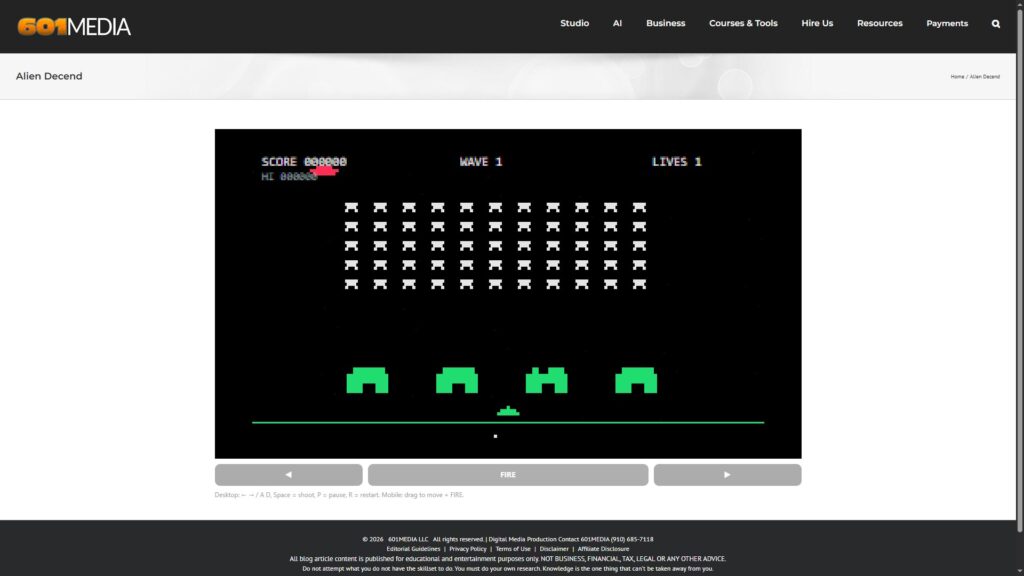
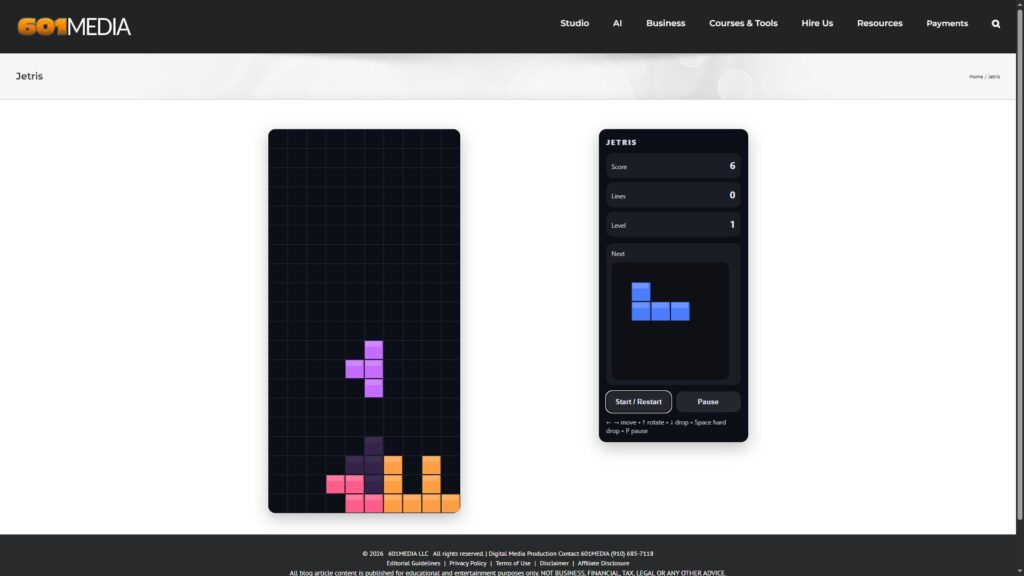
I gave ChatGPT a very simple prompt, and in under five minutes it created both of the following games. Each game uses HTML5’s <canvas> element and JavaScript for the programming logic.
Use HTML5 canvas to create a [Retro Game Name]-style game.
8bit Retro Game Alien Decend
8-Bit Retro Game Jetris
The HTML5 stack for retro games
Modern browsers give you a surprisingly complete “console”:
- Canvas 2D for pixel art rendering
- requestAnimationFrame for smooth timing tied to display refresh
- Web Audio API for synthesized and scheduled sound effects
- Keyboard events for input (plus optional gamepad/touch later)
Canvas first: the default for 2D pixel art
Canvas is the most direct path to retro visuals. You draw sprites, tiles, and UI exactly the way your mental model expects: a frame buffer you control. If you later need heavier effects, you can graduate to WebGL, but most 8-bit games do not need it.
Web Audio API for “chiptune-ish” sound effects
For classic 8-bit vibes, you don’t need full music production on day one. Start with short sound effects using oscillators, envelopes, and basic filters. Web Audio is designed for modular routing and precise scheduling, which is ideal for “tight” arcade feedback.
Input: keyboard basics that feel console-tight
Keyboard input is easy to start and easy to get subtly wrong.
Two practical rules:
- Track key states (pressed/not pressed) rather than reacting to single events.
- Prefer
KeyboardEvent.keyorKeyboardEvent.coderather than deprecatedkeyCode, while checking compatibility for your target browsers.
Core architecture: a game loop you can trust
A retro game lives or dies on feel, and feel lives or dies on timing. Your job is to produce consistent update steps and predictable rendering.
Fixed timestep vs variable timestep
A clean baseline for action games:
- Update: run simulation at a fixed step (example: 60 updates/sec).
- Render: draw as often as the browser allows via
requestAnimationFrame.
Fixed timestep reduces weird physics and input jitter across different machines. Variable timestep can work for simpler games, but you must clamp huge delta spikes (tab switching, slow frames) to avoid “teleporting.”
State machines: menu → play → pause → game over
Even tiny games become messy without explicit states.
Define states early:
- BOOT (load assets, build audio context rules)
- MENU (title, options, controls)
- PLAY (main loop)
- PAUSE (freeze simulation, keep UI responsive)
- RESULT (score, retry, next level)
This keeps your codebase from turning into “if (playing) … else if (paused) …” everywhere.
“ECS-lite” without overengineering
Full ECS can be great, but it can also slow you down.
A practical middle path for 8-bit projects:
- Represent entities as simple objects:
{x, y, vx, vy, spriteId, tags} - Keep systems as functions operating on arrays:
updateMovement(entities),updateCollisions(entities) - Use tags for behavior:
enemy,projectile,pickup
Pixel-perfect rendering: the secret sauce
If your pixels shimmer, blur, or “crawl” during movement, players will feel it instantly.
The goal is stable pixels at any window size.
Internal resolution scaling (and why it matters)
Pick an internal resolution and treat it like your console output. Render to an offscreen canvas at that resolution, then scale it up to the display canvas using nearest-neighbor rules.
This gives you:
- Consistent sprite sizes
- Predictable UI layout
- “Authentic” chunky pixels without blurry scaling
Grid snapping and camera math
Two common causes of shimmer:
- Drawing at fractional positions (example: x = 10.3)
- Camera transforms producing sub-pixel offsets
Retro rule of thumb:
- Store positions in floats for smooth simulation, but snap final draw positions to integers in internal pixel space.
- When using a camera, snap the camera, not just the player, or the world will “crawl.”
Palette discipline and readability
A smaller palette isn’t only aesthetic; it’s usability.
Use palette decisions to guarantee readability:
- High contrast between player and background
- Enemy colors that are distinct at a glance
- UI colors that never compete with gameplay
Asset pipeline: sprites, tiles, maps, and animation
The fastest way to kill momentum is “asset chaos.” The fastest way to build speed is an asset pipeline that is boring and repeatable.
Sprite sheets and frame timing
Sprite sheets keep downloads small and batching simple.
A pragmatic approach:
- One sheet per “theme” (player, enemies, UI, tiles)
- Use named animation clips, not magic numbers
- Store animation metadata in JSON (frame indices + per-frame duration)
Frame timing tip: 8-bit animation often looks best when it is slightly “steppy.” Don’t be afraid of 8–12 FPS for character idle/walk animations, while keeping the game loop at 60 FPS.
Tilemaps without a heavy engine
Tilemaps are retro’s superpower: you can build levels quickly and keep rendering cheap.
A simple setup:
- Tiles are 8×8, 16×16, or 32×32 in internal pixels
- Level is a 2D grid of tile indices
- Collision tiles are derived from a separate collision layer
You do not need a big engine to do this well; you need consistent conventions.
Data formats that keep you sane (JSON, CSV, TMJ)
Choose one format per asset type and stick to it:
- JSON: animations, entity spawns, balancing values
- CSV: simple tile layers or tuning tables (if you love spreadsheets)
- Tiled exports: if you use Tiled for maps, standardize export format and write one importer
Game feel: juice the retro way
Retro feel isn’t only pixels; it’s feedback density. Your game should speak constantly: every jump, hit, pickup, and mistake should be communicated.
Hit-stop, screenshake, and micro-feedback
These are cheap, high-impact techniques:
- Hit-stop: freeze simulation for 2–6 frames on impact
- Screen shake: tiny camera offsets (snapped to pixels) on explosions
- Damage flash: palette swap or tint for a few frames
- Particles: small bursts (2–10 pixels) that fade quickly
The trick is restraint: too much shake and your game becomes exhausting.
Difficulty curves for short-session games
8-bit-style games often live in 1–5 minute loops.
That means difficulty should ramp early:
- Teach one new idea at a time
- Let players recover from early mistakes
- Increase pressure via combinations, not just speed
Design like an arcade: clarity, repetition, and mastery.
Sound design patterns for “8-bit energy”
Web Audio lets you build satisfying sounds with tiny building blocks:
- Pickup: short square wave + quick pitch ramp
- Jump: triangle wave + slight upward sweep
- Hit: noise burst + fast decay envelope
- Explosion: layered noise + low sine thump
Schedule precisely so sound aligns with impact frames, not “whenever the browser gets around to it.”
Using ChatGPT like a game-dev teammate
ChatGPT is most useful when you treat it as a structured collaborator:
- It helps you explore designs quickly
- It drafts boilerplate and utilities fast
- It catches edge cases when you ask it to review with a checklist
It’s least useful when you ask “make my whole game,” because you still need a coherent architecture and a consistent style.
Blueprint prompts that produce usable code
Use prompts that include constraints and acceptance tests.
Example prompt pattern (copy and adapt):
Act as a senior JavaScript game developer.
Goal: implement a fixed-timestep game loop for a Canvas 2D pixel-art game.
Constraints:
- No external libraries
- Separate update(dt) and render(alpha)
- Clamp delta to avoid tab-switch spikes
- Provide a minimal input manager tracking pressed states
Acceptance:
- A moving player square with WASD
- Stable movement across frame rates
- Code must be modular and commented
Why this works: it gives the model a target, boundaries, and a definition of “done.”
Function calling patterns for tools and pipelines
If you’re building tooling around your game (level validators, asset packers, lint rules), function calling makes AI outputs more reliable:
- Define functions like
validateTilemap(json),packSpritesheet(manifest),simulateBalance(config) - Force structured arguments and predictable outputs
- Log inputs/outputs so you can reproduce decisions later
This reduces the “mystery meat” problem where AI gives you something that looks right but is hard to verify.
Using ChatGPT for review, tests, and refactors
Three high-leverage uses:
- Refactor requests: “extract renderer,” “separate physics from input,” “remove hidden globals.”
- Test design: ask for edge cases (tunneling collisions, double-jump bugs, pause-state exploits).
- Performance review: have it identify hot paths (overdraw, allocations per frame, per-entity image lookups).
Always require a diff-like answer or a step-by-step plan, not a vague rewrite.
Shipping: performance, packaging, and polish
Your goal is not “a cool prototype.” Your goal is “a playable game that loads fast, runs smoothly, and explains itself.”
Performance budgets for Canvas games
Canvas performance is usually lost in three places:
- Too many draw calls: especially if you redraw huge backgrounds every frame
- Too many allocations: creating new arrays/objects in the loop
- Too much work per entity: collision checks growing O(n²)
Practical retro budgets:
- Keep sprite draws predictable and batch by spritesheet where possible
- Use spatial partitioning for collisions (grid buckets are often enough)
- Cache anything you can compute once (tile layers, static backgrounds)
Mobile and touch without breaking “retro feel”
Touch controls can fit retro games if they are honest:
- Use a simple virtual D-pad with big hit areas
- Avoid tiny on-screen buttons that cover gameplay
- Offer a “sticky input” option for accessibility
If touch compromises the core feel, consider designing a “mobile mode” with slower pacing or fewer precision jumps.
A release checklist you can actually finish
- First-play clarity: show controls, goal, and win/lose conditions in 10 seconds
- Audio policy: handle browsers that require user interaction before audio starts
- Pause behavior: pausing should freeze simulation and mute or duck audio
- Save data: minimal local storage for options/high score
- Performance smoke test: low-end laptop + mid-range phone
- Accessibility pass: remappable controls, readable UI scaling, reduced motion toggle
- Analytics (optional): track only what you’ll actually use to improve the game
Top 5 Frequently Asked Questions
Final Thoughts
The most important takeaway is that “8-bit” is not a style you sprinkle on top at the end; it’s a production strategy. When you commit to pixel constraints, you gain speed and clarity: speed in iteration, clarity in visuals, clarity in feedback, and clarity in architecture. HTML5 and JavaScript are strong enough to deliver that classic feel in a browser, especially when you anchor your project around a stable loop, pixel-perfect rendering, and scheduled audio. ChatGPT then becomes a multiplier, not a replacement: it accelerates boilerplate, helps you explore designs, and surfaces edge cases—provided you give it sharp constraints, definitions of done, and a modular codebase it can reason about. Build small, keep the pixels steady, make every action sound and feel satisfying, and you’ll end up with something that plays like a cartridge game but ships like a modern web app.
Resources
- MDN: Canvas basic animations (requestAnimationFrame)
- MDN: Anatomy of a video game (main loop concepts)
- MDN: Web Audio API overview
- MDN: Using the Web Audio API
- MDN: OscillatorNode (tone generation)
- MDN: Web Audio API best practices
- MDN: KeyboardEvent.keyCode deprecation guidance
- MDN: Key values for keyboard events
- OpenAI: Prompt engineering guide
- OpenAI: Function calling guide
- Newzoo: Global Games Market Report 2025 (free version)
- Reuters: Newzoo data and market context (June 17, 2025)


Leave A Comment