



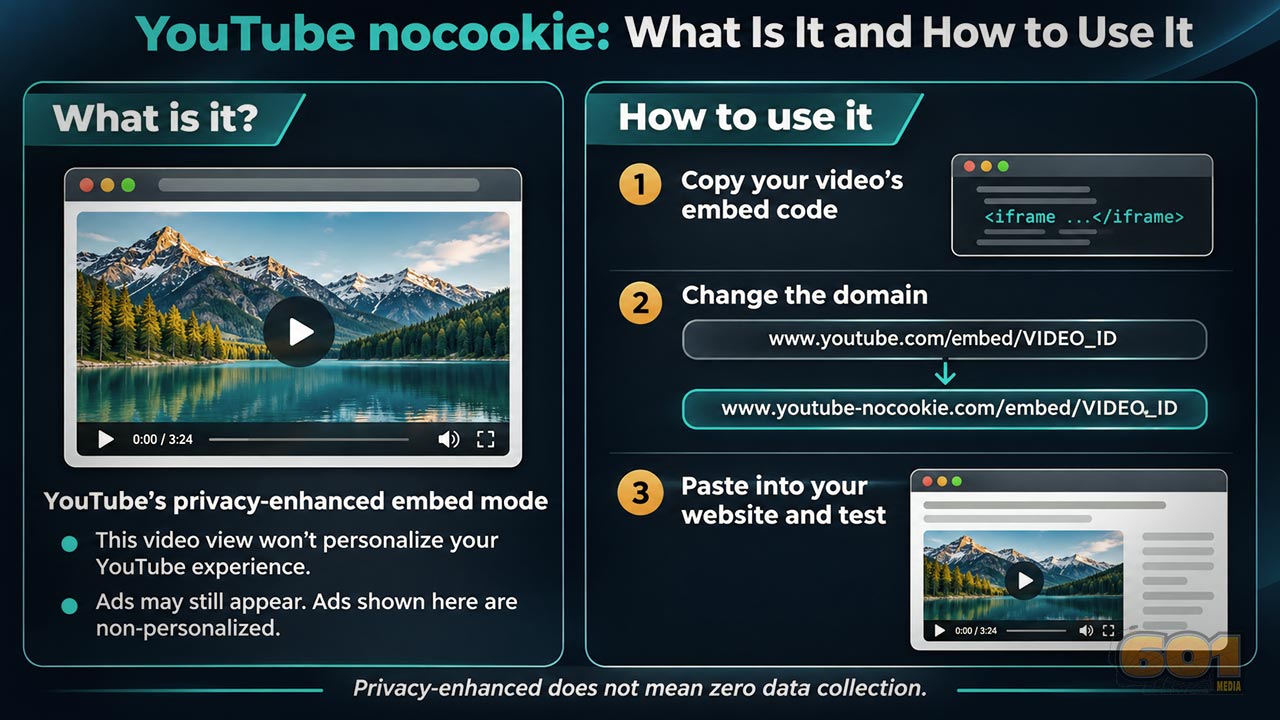
YouTube nocookie, What is it and how to use it
Embedding a YouTube video looks simple, youtube-nocookie.com/ vs youtube.com/, until privacy enters the conversation. This guide explains what the two embed domains change, where their limits matter, and how to choose an implementation you can inspect and maintain on your own website.
Table of Contents
- The main difference between the domains
- A practical comparison
- What privacy-enhanced mode actually promises
- How to change your embed code
- Using privacy-enhanced embeds in WordPress
- Loading speed and click-to-load video
- How to inspect your implementation
- Playback errors, ads, and related videos
- A manageable rollout for existing websites
- Top 5 Frequently Asked Questions
- Final Thoughts
- Resources
The Main Difference Between the Domains
youtube.com is the standard YouTube embed domain. youtube-nocookie.com is the domain YouTube documents for its privacy-enhanced embedded player. You switch modes by changing the hostname in the iframe source while keeping the video identifier.
The distinction concerns an embedded player inside your website. It is not a choice between two competing video hosting services, and it does not move your video library to your own server. Think of it as selecting an embedding mode for the video you already intend to show.
For a website owner, the useful question is what experience the page should provide. Do you want an immediately available player? Do you want the visitor to make a deliberate choice before it loads? Are you updating a single tutorial or establishing a standard across hundreds of articles? Those decisions shape the implementation more than the domain name alone.
My practical preference is to begin with privacy-enhanced mode when adding YouTube embeds, then decide separately when the player should load. That is an editorial and implementation recommendation, rather than a promise that one setting completes every privacy task.
A Practical Comparison
| Question | youtube.com embed | youtube-nocookie.com embed |
|---|---|---|
| Which mode does it select? | Standard embedding | Privacy-enhanced embedding |
| What happens to personalization? | Does not select privacy-enhanced mode | The embedded view is excluded from the personalization uses described by YouTube |
| Can advertisements appear? | Yes | Yes; YouTube says ads served in this mode are non-personalized |
| Does the hostname defer loading until a click? | No | No; that requires a separate loading design |
| Does the hostname control your cookie banner? | No | No |
| Does it guarantee a replay-only ending? | No | No |
The personalization and advertising distinctions above come from YouTube’s embedding guidance. Loading behavior and end-of-video controls are separate implementation concerns.
Use the table as a planning aid. It is easy to select the privacy-enhanced hostname and then assume that performance, consent, and presentation have all been handled. Keep a separate acceptance check for each of those outcomes.
What Privacy-Enhanced Mode Actually Promises
YouTube says views through this mode do not personalize the viewer’s YouTube browsing experience. It also says those views are not used to personalize advertising outside your site or app. If the embedded player serves advertising, that advertising is non-personalized. These are specific limits on personalization, rather than a statement that all information processing stops.
Avoid expanding that documented promise into claims such as “completely anonymous,” “no data collected,” or “tracking is impossible.” A privacy statement should describe the configuration you use and the behavior you have actually established.
Connections, Cookies, and Storage Are Different Things
An iframe source tells the browser where to obtain an embedded document. Changing that address does not create a local copy of the player. When the browser loads an external iframe, it requests content from an external service.
A connection is not the same thing as a cookie. A cookie is also not the only place browser information can be stored: Chrome provides separate inspection tools for cookies and local storage. Checking one list therefore answers a narrower question than inspecting the full page.
For your own audit notes, use precise observations. “No cookies appeared in the inspected storage panel before playback in this test” is more useful than “the video collects nothing.” Record the browser, the page, the consent state, and whether playback had started. That gives you a finding someone else can repeat.
Where Consent Fits
The domain name is not a legal compliance certificate. For example, UK ICO guidance covers storage and access technologies beyond conventional cookies. Its practical consent guidance also discusses embedded features and distinguishes technologies necessary to provide requested content from uses beyond that purpose.
That example should not be treated as a universal rule for every visitor or jurisdiction. Identify the requirements relevant to your audience and implementation before deciding whether the player may load immediately. A visitor pressing an ordinary Play button should not automatically be described as giving informed consent to every possible use of information.
I would write the implementation brief in plain language: what loads initially, what the visitor sees, what the activation button does, and what happens after a refusal. That brief helps a developer and a privacy reviewer assess the same behavior.
How to Change Your Embed Code
For an existing iframe, change the hostname inside its src attribute. Preserve the video ID and review any existing query parameters before saving. This is the conversion YouTube documents.
Standard embed URL:
https://www.youtube.com/embed/VIDEO_IDPrivacy-enhanced embed URL:
https://www.youtube-nocookie.com/embed/VIDEO_IDHere is a starter iframe. Replace VIDEO_ID with your video’s identifier and replace the title with a useful description. The example is shown as escaped code so it will appear in this article without loading a live video.
<iframe
  width="560"
  height="315"
  src="https://www.youtube-nocookie.com/embed/VIDEO_ID"
  title="Video tutorial: replace with your video title"
  loading="lazy"
  referrerpolicy="strict-origin-when-cross-origin"
  allow="encrypted-media; picture-in-picture; fullscreen"
  allowfullscreen>
</iframe>
The iframe has no autoplay parameter. Lazy loading is a browser hint to defer an iframe until it is likely to be needed; it is not a requirement for a visitor to click first.
The referrer setting follows YouTube’s recommendation to preserve the identifying referrer header. For cross-origin requests between secure pages, this policy sends the site’s origin rather than its full page path.
This example establishes the player configuration, not the final page layout. Check how your theme handles the specified dimensions. Plan responsive sizing with your developer or builder, and keep the controls usable on small screens. YouTube requires an embedded viewport of at least 200 by 200 pixels.
Using Privacy-Enhanced Embeds in WordPress
For WordPress, I recommend testing one unpublished page before changing a site-wide setting. Use an HTML-capable block or builder element available in your installation, paste the actual iframe code, and preview the result. If the editor removes or rewrites the iframe, resolve that behavior before using the pattern elsewhere.
Do not assume that pasting a normal YouTube watch link produces your preferred iframe hostname. Inspect the final page. What matters is the rendered result visitors receive, including any changes made by your theme, page builder, optimization settings, or consent configuration.
A practical WordPress review sequence is:
- Choose a test page and save a copy of its original content.
- Add one privacy-enhanced iframe with a descriptive title.
- Preview it on desktop and a narrow mobile layout.
- Inspect the final iframe source in the browser.
- Check the page while signed out of WordPress.
- Test any accept, reject, and video-activation controls.
- Clear relevant caches after publishing, then repeat the visitor check.
For a site using Avada or another visual builder, keep a note of the element and settings that produced the verified result. That becomes your repeatable editing recipe. It is easier to maintain one documented pattern than to remember which combination worked on each article.
If a plugin offers a privacy-enhanced option, treat the label as the starting point for inspection. Confirm the resulting hostname and loading behavior on an actual published page.
Loading Speed and Click-to-Load Video
Changing a hostname does not establish a performance improvement. For that, consider when the embedded player is downloaded. web.dev recommends using lightweight facades for third-party embeds: a placeholder appears first, and the real embed loads after interaction.
There are three useful implementation choices:
- Immediate player: the iframe is present and available to load when the page is processed.
- Lazy-loaded player: the browser can delay the iframe until it approaches the visible area.
- Click-to-load player: your page inserts the iframe after the visitor activates a placeholder.
The second choice is browser-controlled scheduling. The third is a deliberate interaction boundary. Those serve different goals, even if both can reduce initial work on a page.
web.dev’s iframe guidance reports roughly 500 KB of initial-load savings for its YouTube lazy-loading example. Treat that as an illustration from a particular implementation, not a promised saving for every video or website. Measure your own page.
If your requirement is no YouTube connection before activation, design the whole placeholder around that requirement. Use an image served from your own website, avoid preconnecting to YouTube, and avoid loading the player API in advance. Some performance patterns deliberately preconnect on hover; that is earlier than a click.
A locally hosted thumbnail also gives you a useful editorial opportunity. Make the image meaningful, label the button clearly, and tell visitors that activation loads a YouTube video. Avoid a misleading “Play privately” label unless you can explain exactly what it means.
How to Inspect Your Implementation
Chrome DevTools lets you inspect network requests and browser storage. Open its Network panel before reloading the page so the load is recorded. In the Application panel, inspect Cookies and Local Storage separately.
I recommend a small comparison rather than a complicated audit at the outset. Build two test pages with the same video and surrounding content. Change only the embed hostname. Then, if needed, create a third version with your click-to-load implementation.
Use this sequence for each page:
- Start with a fresh test session and note the browser’s privacy settings.
- Open DevTools, select Network, and reload the page.
- Record requests before touching the player.
- Inspect the available cookie and local-storage entries.
- Start playback, then repeat the network and storage observations.
- Repeat with each consent choice your website offers.
Keep the comparison fair. Use the same video, browser settings, and playback stage. If you change a plugin setting between tests, record it. If one page uses a placeholder and the other loads an iframe immediately, identify that as a second variable.
For a click-to-load design, define a concrete pass condition before testing: no requests to YouTube or its supporting delivery domains before activation. Inspect all external requests, rather than filtering only for the word “youtube.” A remote thumbnail or early script can reveal a gap in the design.
These are recommended checks, not results from a live audit of any particular website. Browser observations establish what happened under the tested conditions; they do not expose every internal decision made by the remote service.
Playback Errors, Ads, and Related Videos
What if the player shows error 153?
YouTube documents error 153 when a request lacks the HTTP Referer header or equivalent client identification. Review referrer restrictions and test the iframe inside its intended webpage, rather than judging it only from an embed URL opened directly in the address bar.
If you are troubleshooting, change one thing at a time. Begin with the smallest working iframe on a test page. Add your builder, consent, and optimization behavior back in stages. That approach makes a failure easier to associate with a particular change.
Does this remove advertising?
No. Privacy-enhanced mode allows non-personalized advertising. It should not be presented as an ad-blocking setting.
Will the video end with only a replay button?
The hostname does not select that ending. YouTube’s parameter documentation says rel=0 limits related videos to the same channel; it does not disable them. It also identifies modestbranding as deprecated and ineffective. Neither setting supplies a guaranteed clean ending.
If precise presentation is part of your project brief, list the desired controls, branding, advertising behavior, and ending before choosing a hosting solution. Evaluate those requirements individually instead of trying to infer them from a privacy setting.
A Manageable Rollout for Existing Websites
For a publisher with a substantial article archive, I would begin with a small inventory. Identify the pages where video is central to the content, the pages with several embeds, and the shared templates that add video automatically. That gives you a sensible order of work.
Start with one representative article. Establish the preferred player mode, decide whether activation should be immediate or delayed, and verify the result. Then write a short internal standard containing the approved embed example and the checks an editor should perform.
Avoid an unreviewed replacement of every occurrence of youtube.com. Your article links, channel links, and player URLs serve different purposes. Scope any automated change to the actual embed sources you intend to modify, review a sample, and keep a recoverable copy of the original content.
My suggested release checklist includes playback, captions where available, fullscreen behavior, mobile layout, activation text, and the page’s behavior after a visitor declines optional loading. Include an ordinary link to the video if your design needs a fallback.
Finally, assign ownership. Someone should know where the embed recipe lives and when to revisit it. A repeatable editing standard is easier to sustain than a one-time cleanup that nobody documents.
Top 5 Frequently Asked Questions
1. What is the difference between youtube-nocookie.com and youtube.com?
The former selects YouTube’s privacy-enhanced embedded player; the latter is the standard embed domain. The documented distinction concerns personalization of the embedded viewing activity.
2. Does youtube-nocookie.com mean no data is collected?
Do not interpret the hostname as that guarantee. Describe the specific personalization limits YouTube documents, and inspect the network and storage behavior of your own implementation.
3. Does privacy-enhanced mode remove ads and related videos?
No. Non-personalized ads can still appear. Related-video behavior is separate; YouTube says rel=0 restricts related videos to the same channel instead of removing them.
4. How do I enable privacy-enhanced mode on my website?
Change the iframe source hostname from www.youtube.com to www.youtube-nocookie.com, preserve the video ID, and verify the rendered page.
5. How can I delay YouTube connections until a visitor chooses to load the video?
Use a locally served placeholder and insert the iframe after activation. Avoid advance third-party requests, including remote thumbnails, preconnections, and player scripts, then check the result in the browser.
Final Thoughts
The most useful decision is to define the visitor experience first. Choose your player mode, choose when it loads, and verify the page that visitors actually receive. Those are three practical tasks you can document and repeat.
For my own publishing workflow, I would establish a privacy-enhanced embed recipe and use a locally hosted click-to-load placeholder wherever delaying external video loading is a project requirement. I would test that pattern on one article before applying it across an archive.
Keep your public explanation just as concrete. Tell visitors which service provides the video and what happens when they activate it. Keep internal notes showing how you checked the result. That combination gives editors a manageable workflow and visitors a clearer choice, without relying on a domain name to explain the entire system.
Resources
- YouTube Help: Embed videos and playlists, including privacy-enhanced mode
- Google for Developers: YouTube embedded player parameters
- MDN: iframe loading behavior
- web.dev: Lazy-loading offscreen iframes
- web.dev: Best practices for third-party embeds
- YouTube API Services: Required minimum functionality
- MDN: iframe referrer policy
- Chrome DevTools: Inspect cookies
- Chrome DevTools: Inspect local storage
- UK ICO: Cookies and similar technologies
- UK ICO: Managing consent in practice
- Chrome DevTools: Network panel overview
- YouTube IFrame Player API reference


Leave A Comment